

What Makes Bottom Sheets a Powerful Mobile UI Pattern?
Key Takeaways
- Bottom sheets are flexible UI elements that slide up from the bottom, providing extra content without disrupting the user’s flow.
- They help maintain context, allowing users to interact without leaving the current screen.
- There are two main types: modal (which requires action) and persistent (which stays visible alongside content).
- Bottom sheets can boost engagement thanks to their non-intrusive, easy-to-dismiss design.
- Keeping content concise, accessible, and easy to close improves usability.
- Common uses include menus, form inputs, and media controls.
- When used effectively, bottom sheets enhance interaction while keeping the experience smooth and intuitive.
Introduction to Bottom Sheets
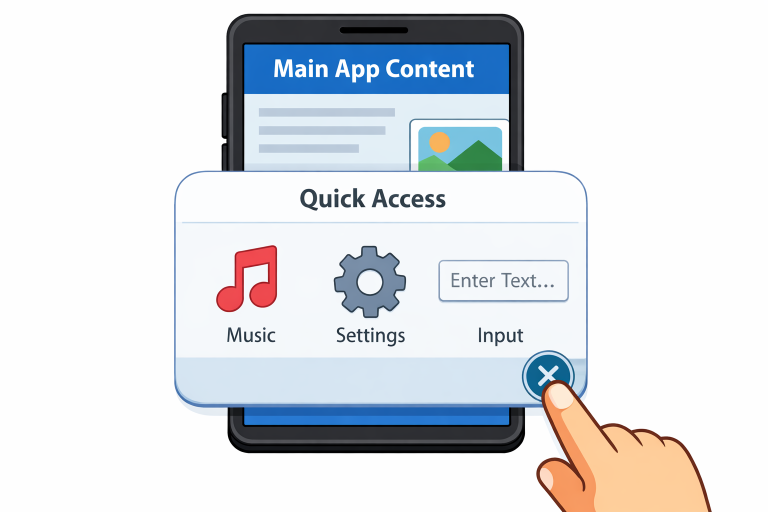
As mobile applications strive to be more intuitive and user-centric, interface patterns such as bottom sheets have become essential to modern app design. Bottom sheets are UI elements that slide up from the bottom of the screen, providing a seamless way for users to access additional content or actions without leaving the current context. Their versatility and unobtrusive behavior contribute to their popularity among designers and developers alike. If you are studying different interface elements, exploring the bottom sheet UI pattern reveals just how adaptable this component can be across various app experiences.
Instead of interrupting workflows or breaking user focus, bottom sheets add layers of information or interactivity discreetly. This approach enables apps to deliver richer experiences while minimizing friction. Whether prompting users with contextual options or fetching quick details, bottom sheets have emerged as a subtle yet effective way to handle additional tasks and content.
Used in countless top mobile apps, bottom sheets let users access more without closing or navigating away from their current view. Unlike pop-ups or modal alerts that demand immediate attention and disrupt continuity, these sheets gently slide into view and can be dismissed just as easily.
By balancing accessibility and non-intrusiveness, bottom sheets maintain user engagement and fluid interaction. This is especially critical for apps focused on usability and streamlined workflows.
Types of Bottom Sheets
- Modal Bottom Sheets: These overlay the app’s main content and typically require users to interact with them before returning to the main interface. They’re ideal for tasks like presenting choices, requesting confirmation, or offering additional action menus that require immediate decisions.
- Persistent Bottom Sheets: Unlike their modal counterparts, persistent bottom sheets stay visible alongside the main content and offer ongoing interaction. These are perfect for scenarios where supplemental details, such as mini music players or cart details in e-commerce, are needed without forcing navigation away from the current screen.
Advantages of Using Bottom Sheets
Mobile applications benefit from implementing bottom sheets in several key ways:
- Enhanced User Engagement: Data indicates that bottom sheets achieve 25-30% higher engagement rates than traditional modal dialogs. This uptick in engagement is due to the less intrusive nature of bottom sheets and their ease of dismissal, making them suitable for notifications about new features, limited-time offers, or important action prompts without interrupting the user’s activity.
- Preserved Context: Because bottom sheets overlay the current view, users do not lose their place or mental model of the screen, reducing cognitive load and improving usability.
- Flexibility: Bottom sheets are highly adaptable, fitting everything from brief informational tooltips and action menus to more robust forms and media controls, making them an asset for a wide range of app functions.
Best Practices for Designing Bottom Sheets
To maximize the value of bottom sheets, designers should incorporate the following best practices:
- Keep Content Concise: Limit the information shown in a bottom sheet to strictly relevant content. Overloading users with too much at once can be overwhelming and reduce the component’s effectiveness.
- Provide Clear Dismissal Options: Always include obvious visual cues such as a drag handle or a close button. An easy way to exit the sheet helps users feel in control and reduces frustration.
- Ensure Accessibility: Design bottom sheets so that they are usable by everyone, including those with disabilities. This includes proper labeling for screen readers, appropriate color contrast, and ensuring that interactive elements are easily reachable and tappable.
Common Use Cases for Bottom Sheets
Bottom sheets fit naturally in many mobile app scenarios. Here are a few typical use cases:
- Displaying Menus: Use bottom sheets to present context-specific action lists or settings, improving discoverability and user control.
- Form Inputs: Quickly collect details or input from users, such as payment information or feedback, without completely removing them from the original task.
- Media Controls: Offer audio, video, or podcast playback controls in a minimized interface that users can access or dismiss as needed, enhancing a multitasking-friendly environment.
Implementing Bottom Sheets in Android
Android developers have robust tools for integrating bottom sheets into apps. For modal bottom sheets, the BottomSheetDialogFragment component is a standard solution, allowing for bottom sheets that require user interaction before dismissal. For persistent functionality, BottomSheetBehavior it offers a flexible way to display content that is always visible while users browse primary app screens. These components are designed to work smoothly within the Android system and provide built-in support for animations and gesture controls.
Final Thoughts
Bottom sheets are an essential part of the modern mobile UI toolkit, delivering both convenience and functionality for users while preserving context and supporting complex interactions. Their minimal interruption and ease of access make them a go-to pattern for mobile designers and developers seeking to improve engagement, usability, and overall app quality. When designed with best practices in mind, including accessibility and concise communication, bottom sheets can transform how users interact with mobile content and actions.
